
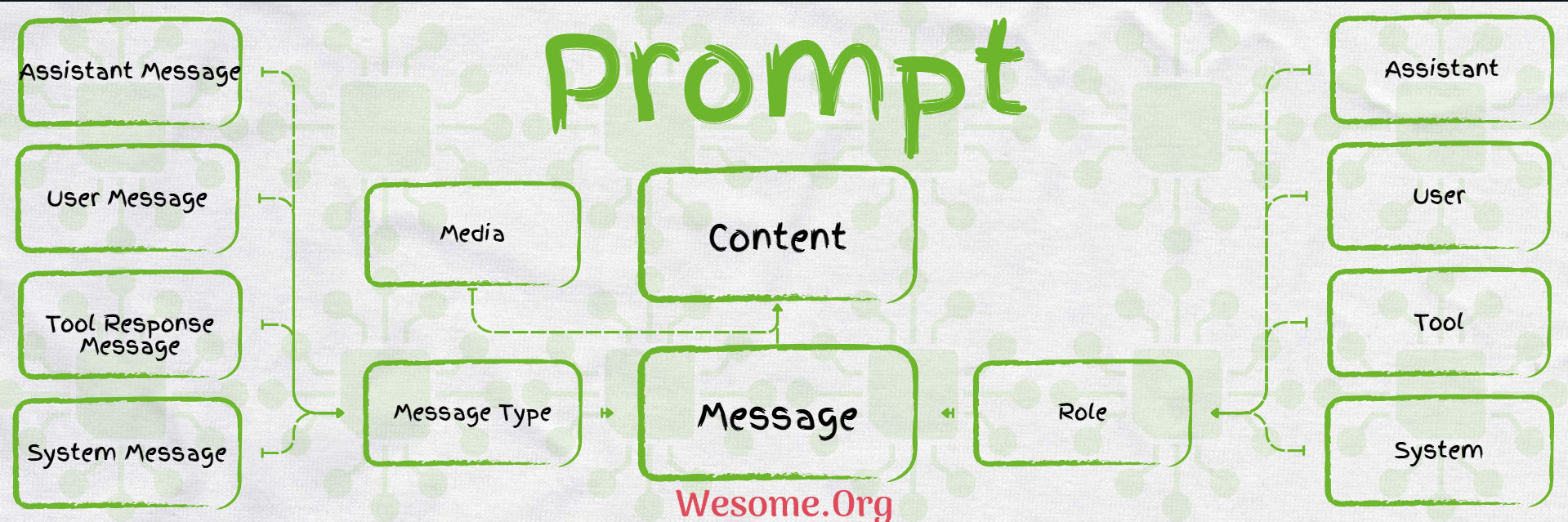
Prompts are guides and instructions that direct the AI Model to generate the desired output. They significantly impact the production of the AI Model response. it provides generic instructions with placeholders to add user-defined values at run time. Spring Ai Prompt uses the String Template provided by Java 17 to create Prompts.
Message
Spring AI provides a Message Interface that encapsulates the Prompts and metadata around the Prompt Execution.
Roles

The Prompt Messages are assigned a specific role. these roles are used to categorize and clarify the Message provided in the Prompt. Majorly AI Models uses 4 types of Roles.
-
System Role: The
System Rolehas the highest priority of theRole. it directs theAI Modelbehavior andresponsestyle, it setsparametersandrulesfor theAI Modelto execute and respond to the commands. -
User Role: The
User Rolerepresents the user’s input such asquestions,commands, orstatementsto theAI Model. ThisRoleprovides the context for theAI Model Response. -
Assistant Role:
Spring Aisupports communication with theModel, and maintains the flow of conversation. it keeps track of the previousUsers' MessagesandAI Responsesto keep the response relevant to the topic. SometimesAssistant Messagemay call the externaltoolorfunctionsto enhance theAI Modelcapabilities. -
Tool or Function Role: The
ToolorFunction Roleenhances the functionality of theAI Modelby calling additional externaltoolsthat provide additional information in the response.
package com.example.springai.controller;

import org.springframework.ai.chat.client.ChatClient;
import org.springframework.ai.chat.messages.AssistantMessage;
import org.springframework.ai.chat.messages.SystemMessage;
import org.springframework.ai.chat.messages.UserMessage;
import org.springframework.ai.chat.prompt.Prompt;
import org.springframework.web.bind.annotation.GetMapping;
import org.springframework.web.bind.annotation.RestController;

import java.util.List;

@RestController
public class SpringAiController {
    private final ChatClient chatClient;

    public SpringAiController(ChatClient.Builder chatClient) {
        this.chatClient = chatClient.build();
    }

    @GetMapping("/prompt")
    public AssistantMessage prompt() {
        var systemMessage = new SystemMessage("You are an assistant that speaks like Shakespeare.");
        var userMessage = new UserMessage("tell me a joke.");
        var prompt = new Prompt(List.of(systemMessage, userMessage));
        return chatClient.prompt(prompt).call().chatResponse().getResult().getOutput();
    }
}
package com.example.springai;

import org.springframework.boot.SpringApplication;
import org.springframework.boot.autoconfigure.SpringBootApplication;

@SpringBootApplication
public class SpringAiApplication {
    public static void main(String[] args) {
        SpringApplication.run(SpringAiApplication.class, args);
    }
}
spring.application.name=SpringAi
spring.docker.compose.lifecycle-management=start-only
spring.threads.virtual.enabled=true
# The default Ollama Model in Spring Ai is mistral, but it can be changed by setting the below property. make sure to download the same model in entrypoint.sh file
#spring.ai.ollama.chat.options.model=llama3.1
# If running the Ollama Docker Instance separately, then set this property
spring.docker.compose.enabled=false
services:
  ollama-model:
    image: ollama/ollama:latest
    container_name: ollama_container
    ports:
      - 11434:11434/tcp
    healthcheck:
      test: ollama --version || exit 1
    command: serve
    volumes:
      - ./ollama/ollama:/root/.ollama
      - ./entrypoint.sh:/entrypoint.sh
    pull_policy: missing
    tty: true
    restart: no
    entrypoint: [ "/usr/bin/bash", "/entrypoint.sh" ]

  open-webui:
    image: ghcr.io/open-webui/open-webui:main
    container_name: open_webui_container
    environment:
      WEBUI_AUTH: false
    ports:
      - "8081:8080"
    extra_hosts:
      - "host.docker.internal:host-gateway"
    volumes:
      - open-webui:/app/backend/data
    restart: no

volumes:
  open-webui:
#!/bin/bash
# Start Ollama in the background.
/bin/ollama serve &
# Record Process ID.
pid=$!
# Pause for Ollama to start.
sleep 5
# The default Ollama Model in Spring Ai is mistral, but it can be changed in the applications property file. Make sure to download the same Model here
echo "🔴 Retrieve LLAMA3 model..."
ollama pull mistral
echo "🟢 Done!"
# Wait for the Ollama process to finish.
wait $pid
<?xml version="1.0" encoding="UTF-8"?>
<project xmlns:xsi="http://www.w3.org/2001/XMLSchema-instance" xmlns="http://maven.apache.org/POM/4.0.0"
         xsi:schemaLocation="http://maven.apache.org/POM/4.0.0 https://maven.apache.org/xsd/maven-4.0.0.xsd">
    <modelVersion>4.0.0</modelVersion>
    <parent>
        <groupId>org.springframework.boot</groupId>
        <artifactId>spring-boot-starter-parent</artifactId>
        <version>3.3.2</version>
        <relativePath/>
    </parent>
    <groupId>com.example.springai</groupId>
    <artifactId>Prompt</artifactId>
    <version>0.0.1-SNAPSHOT</version>
    <name>Prompt</name>
    <description>Demo project for Spring Boot</description>

    <properties>
        <java.version>21</java.version>
        <spring-ai.version>1.0.0-SNAPSHOT</spring-ai.version>
    </properties>
    <dependencies>
        <dependency>
            <groupId>org.springframework.boot</groupId>
            <artifactId>spring-boot-starter-web</artifactId>
        </dependency>
        <dependency>
            <groupId>org.springframework.ai</groupId>
            <artifactId>spring-ai-ollama-spring-boot-starter</artifactId>
        </dependency>
        <dependency>
            <groupId>org.springframework.boot</groupId>
            <artifactId>spring-boot-docker-compose</artifactId>
            <scope>runtime</scope>
            <optional>true</optional>
        </dependency>
        <dependency>
            <groupId>org.springframework.boot</groupId>
            <artifactId>spring-boot-starter-test</artifactId>
            <scope>test</scope>
        </dependency>
    </dependencies>
    <dependencyManagement>
        <dependencies>
            <dependency>
                <groupId>org.springframework.ai</groupId>
                <artifactId>spring-ai-bom</artifactId>
                <version>${spring-ai.version}</version>
                <type>pom</type>
                <scope>import</scope>
            </dependency>
        </dependencies>
    </dependencyManagement>

    <build>
        <plugins>
            <plugin>
                <groupId>org.springframework.boot</groupId>
                <artifactId>spring-boot-maven-plugin</artifactId>
                <configuration>
                    <mainClass>com.example.springai.SpringAiApplication</mainClass>
                    <excludes>
                        <exclude>
                            <groupId>org.projectlombok</groupId>
                            <artifactId>lombok</artifactId>
                        </exclude>
                    </excludes>
                </configuration>
            </plugin>
        </plugins>
    </build>
    <repositories>
        <repository>
            <id>spring-milestones</id>
            <name>Spring Milestones</name>
            <url>https://repo.spring.io/milestone</url>
            <snapshots>
                <enabled>false</enabled>
            </snapshots>
        </repository>
        <repository>
            <id>spring-snapshots</id>
            <name>Spring Snapshots</name>
            <url>https://repo.spring.io/snapshot</url>
            <releases>
                <enabled>false</enabled>
            </releases>
        </repository>
    </repositories>
</project>
Run the curl to see the Spring Ai Prompt
curl --location 'localhost:8080/prompt'


